
Close Menu
FintechFetch
    FintechFetch
    • Home
    • Fintech
    • Financial Technology
    • Credit Cards
    • Finance
    • Stock Market
    • More
      • Business Startups
      • Blockchain
      • Bitcoin News
      • Cryptocurrency
    FintechFetch
    Home»Business Startups»5 time-saving Outlook features you’re probably overlooking
    Business Startups

    5 time-saving Outlook features you’re probably overlooking

    FintechFetchBy FintechFetchSeptember 22, 2025No Comments3 Mins Read
    Share Facebook Twitter Pinterest LinkedIn Tumblr Reddit Telegram Email
    Share
    Facebook Twitter LinkedIn Pinterest Email


    I’m a big fan of efficiency, mostly because I’m also a big fan of doing as little work as possible while still getting things done.

    Thankfully, Microsoft Outlook is packed with hidden gems and clever little features designed to make work life easier. The only problem: They’re buried under a bunch of menus or just aren’t obvious. Here are five of my favorite built-in Outlook features you might not be using yet.

    Quick Steps

    “Quick Steps” is a neat little automation feature that lets you create a single-click button to perform multiple actions on an email.

    For example, you could have a Quick Step that moves an email to a specific folder, marks it as having been read, and then forwards it to a colleague. Or one that marks it as done and archives it.

    It’s essentially a macro for your email, allowing you to automate those repetitive, multistep actions and get them done in a fraction of the time. Click the Quick Steps button in the main ribbon to start setting them up.
    Focused Inbox

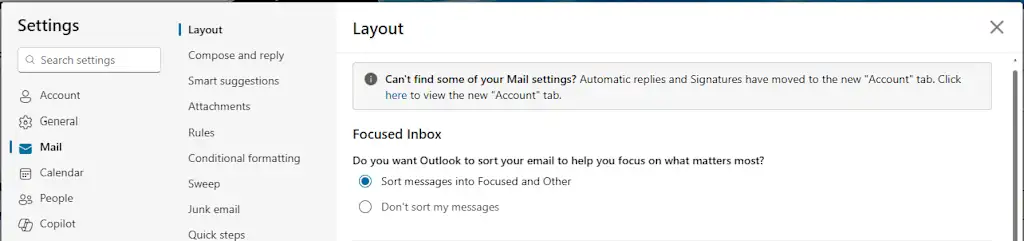
    The best way to deal with email is to not deal with it at all. For that, Outlook has a feature called “Focused Inbox” that uses machine learning to decide which emails are important and which are just noise.

    It automatically sorts your messages into two tabs: “Focused” and “Other.” The “Other” tab is where all the newsletters, notifications, and promotional emails go to live in peace.

    This isn’t a filter you have to set up yourself; it’s a smart system that learns what you care about.

    To enable it, go to Settings > Mail > Layout, and toggle Focused Inbox on.
    Ignore Conversation

    Can you call it a real job if you’re not part of at least one long email chain with a dozen other people, and after the third reply-all, you realize the chain no longer has anything to do with you?

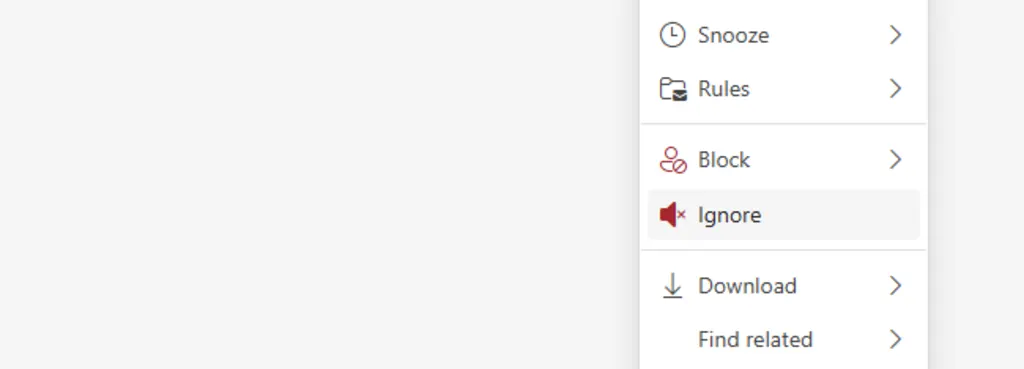
    This is where the “Ignore Conversation” feature comes in. It’s a tiny little lifesaver.

    Select an email in your inbox pane, right-click on it, and choose “Ignore.” Every subsequent message in that thread will automatically be moved to your “Deleted Items” folder. It’s an easy, guilt-free way to excuse yourself from a digital conversation you have no interest in participating in.
    Sweep

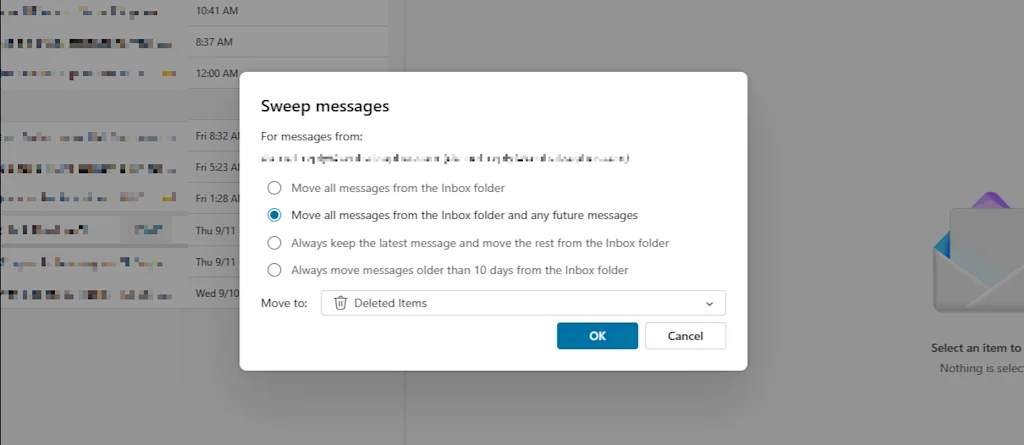
    We’ve all signed up for a service, gotten 100 emails, and then realized we don’t want them anymore. Luckily, Outlook has a “Sweep” feature that automates the whole process of mass deletion.

    It lets you quickly delete all messages from a specific sender, and you can set a rule to automatically delete any future emails from them as they arrive.

    To use it, click Sweep in the main ribbon while viewing a message from a sender you no longer want to hear from, and select how you’d like to treat current and future messages.
    Drag-and-drop meeting scheduling

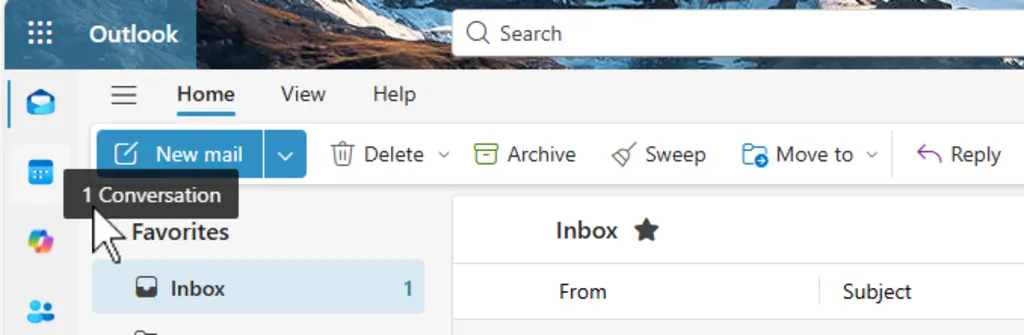
    You’ve received an email from someone, and you need to set up a meeting with them. Just drag and drop the message from your inbox onto your calendar icon.

    Outlook will automatically create a new meeting invitation, with the email subject as the meeting title and the email recipient as an attendee. It’s a huge time-saver when you’re working with multiple clients or colleagues and need to get a meeting on the books in a hurry.


    Source link

    Share. Facebook Twitter Pinterest LinkedIn Tumblr Email
    Previous ArticleAsian Crypto Landscape This Week: India Audits, Japan Facilitates Expansion, Vietnam Dubuts Crypto Exchange
    Next Article Small Businesses in India and Brazil Can Now Accept Payments Directly on WhatsApp
    FintechFetch
    • Website

    Related Posts

    Business Startups

    U.S. breaks with UN on global AI oversight

    September 27, 2025
    Business Startups

    More women than ever are freezing their eggs, but many aren’t returning to use them, study finds

    September 27, 2025
    Business Startups

    FDA detects radioactive contamination in spices as massive shrimp recall expands

    September 27, 2025
    Add A Comment
    Leave A Reply Cancel Reply

    Top Posts

    SBI Digital Markets Joins Forces to Open Up Tokenised Securities to More Investors

    September 16, 2025

    payabl. Finds UK Shows No Sympathy for Long Checkouts and Willing to Abandon Fraud Checks for Speed

    March 22, 2025

    Financial independence among Canadians’ top goals: CIBC

    March 26, 2025

    SmartStream Partners With Finastra to Provide a Complete Collateral Management Workflow

    April 5, 2025

    What Does it Mean for XRP’s Price?

    September 2, 2025
    Categories
    • Bitcoin News
    • Blockchain
    • Business Startups
    • Credit Cards
    • Cryptocurrency
    • Finance
    • Financial Technology
    • Fintech
    • Stock Market
    Most Popular

    Brankas and Gimasys Team Up to Support Open Banking in Vietnam

    June 24, 2025

    Should I cash in my Rolls-Royce shares?

    March 14, 2025

    Which? Urges UK Government to Consider New Laws as Consumer Confidence in UK Economy Falls

    May 6, 2025
    Our Picks

    XRP at a Make-or-Break Level Under Heavy Pressure

    September 28, 2025

    How long might it take to make a million pounds in a SIPP investing £250 a month?

    September 28, 2025

    Bitcoin Fear & Greed Index Crashes To Lowest Level Since March, Why This Is Good News

    September 28, 2025
    Categories
    • Bitcoin News
    • Blockchain
    • Business Startups
    • Credit Cards
    • Cryptocurrency
    • Finance
    • Financial Technology
    • Fintech
    • Stock Market
    • Privacy Policy
    • Disclaimer
    • Terms and Conditions
    • About us
    • Contact us
    Copyright © 2024 Fintechfetch.comAll Rights Reserved.

    Type above and press Enter to search. Press Esc to cancel.